Why More MCP Servers Do Not Finish the Workflow
MCP is valuable connectivity. The workflow still needs a host that maintains state, understands relationships, validates the combined result, and owns recovery.
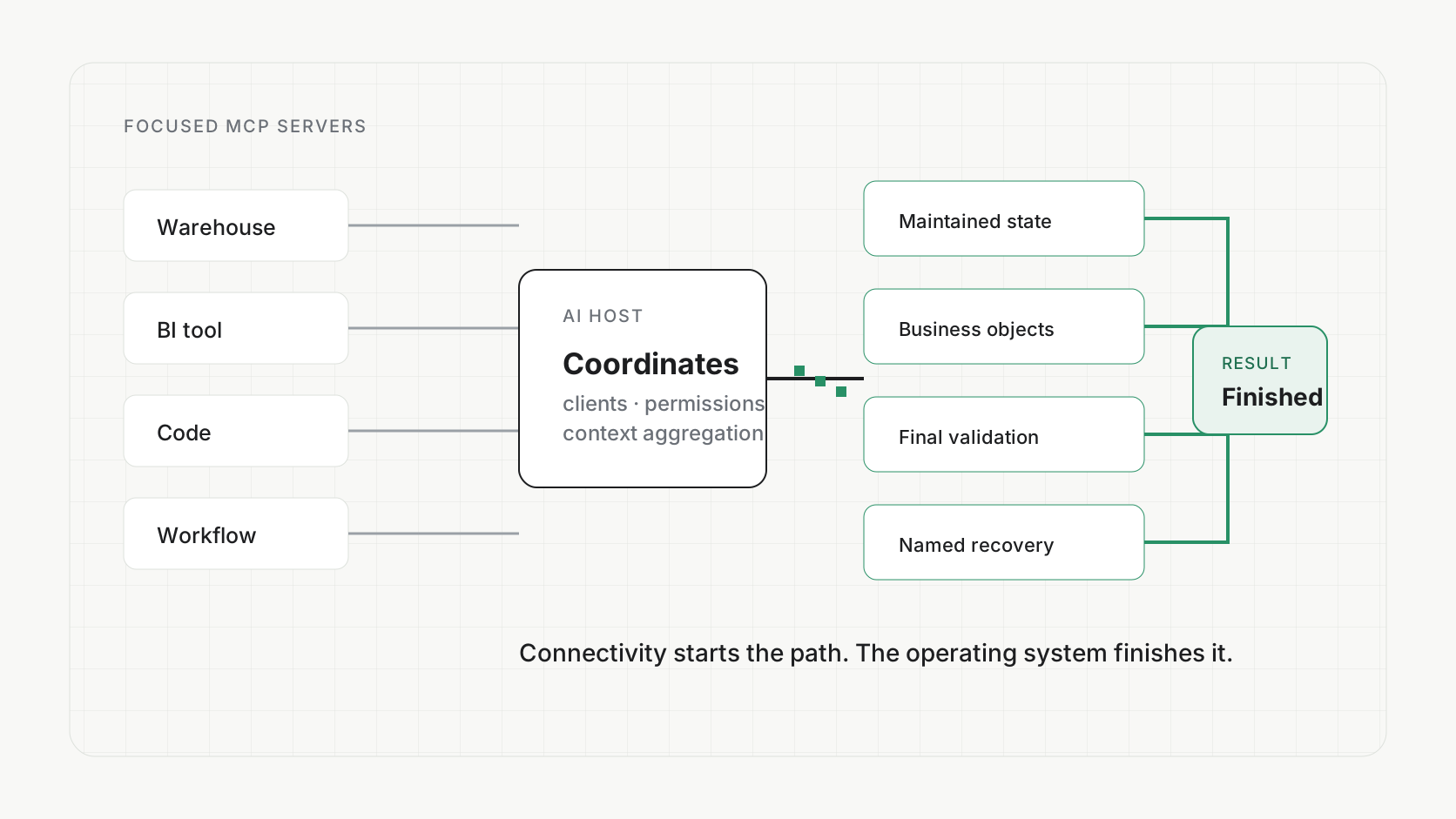
MCP servers can give an AI access to your warehouse, BI tool, code repository, catalog, workflow system, CRM, and documents. That is a real improvement. It still does not mean the AI owns the workflow that crosses them.
I keep seeing the same pattern. A team connects more tools. The AI becomes more capable inside the chat. Then a person still has to tell it what to inspect next, carry screenshots and definitions between steps, decide whether the combined result is correct, and recover when one connection fails.
The person has become the integration and supervision layer.
What MCP solvesMCP removes a lot of integration friction
The official Model Context Protocol architecture describes a host that manages multiple clients, with each client maintaining an isolated connection to one server. Servers expose focused resources, tools, and prompts. The host coordinates model integration, permissions, consent, and context aggregation.
That separation is useful. A warehouse server can focus on warehouse operations. A BI server can focus on reports. A catalog server can focus on governed metadata. The host can compose those capabilities without every vendor building a custom integration for every AI client.
For a bounded task, this can be enough. If the job is “create a Jira issue from this meeting note,” one or two well-designed tools and a clear confirmation step may solve the entire problem.
If the whole job begins and ends inside one specialist product, the product's own AI may be the best answer. Do not build an orchestration platform around work that does not need one.
A tool description is not an understanding of the system
An MCP server can expose many capabilities, but a good server usually presents a focused interface rather than its entire internal system. According to the protocol's tool specification, the client discovers a tool through metadata such as its name, description, and input schema, then receives the result of calling it.
That is exactly what makes the interface practical. It is also a boundary.
A description such as “get pipeline velocity” does not automatically reveal which opportunity stages count, whether reopened deals are included, how source records are deduplicated, when the underlying model last ran, which code implements the behavior, or what tests would prove a proposed change is safe. The model can call the tool correctly and still have to guess about the system behind it.
This is the same problem as a Metric with only a description. The label may be accurate and still be insufficient. When the job becomes consequential, the AI needs either a richer inspectable explanation or legitimate access to the implementation, evidence, and feedback loop behind the interface.
Connectivity question
Can the AI discover and call the warehouse, dashboard, code, workflow, and CRM capabilities it needs?
Outcome question
Can one system carry the same business goal, state, permissions, evidence, validation, and recovery across all of them?
Why Codex and Claude Code are powerful for this work
Coding agents are often stronger for investigation and construction because they can operate inside a broad, inspectable workspace. The Codex CLI documentation describes an agent that can inspect a repository, edit files, and run the tools already installed in the environment. Claude Code describes an agentic loop that searches files, makes changes, runs commands and tests, reads the result, and adjusts.
That loop gives the agent a chance to learn from reality instead of only from a tool description.
Find definitions, models, jobs, tests, and prior decisions.
Understand how the relevant pieces actually connect.
Edit the model, test, configuration, or documentation.
Execute the real build, query, or processing path.
Read failures, outputs, and the user-facing result.
Revise until the acceptance condition is met.
This is not a choice between coding agents and MCP. Codex and Claude Code can use MCP to reach external systems, and MCP tools can be excellent components in the loop. The real choice is whether the agent has enough inspectable context and feedback to finish the job, or only a narrow window into a system whose behavior remains opaque.
If you own the environment, I would start with a CLI and repository the agent can search, build, test, and improve. Add MCP servers for focused, permissioned access to external products. Do not assume that adding more point tools will substitute for the workspace, business meaning, state, and acceptance checks the complete job requires.
The workflow breaks between successful tool calls
Imagine a revenue leader asks:
Add time from first qualified demo to signed contract to our weekly pipeline dashboard, break it down by lead source, and alert us when it gets materially longer.
A warehouse connection can query data. A coding agent can change a model. A BI connection can update a report. An automation tool can schedule an alert.
Each call can succeed while the business job still fails.
The qualified-demo definition may differ across teams. The model change may duplicate opportunities. The dashboard may still use the old Dataset. The alert may fire before processing completes. Nobody may inspect the rendered report. The threshold may require a business decision the AI should not invent.
Those are not connector failures. They are failures of the operating environment around the connectors.
- 01
ConnectionsTools and data
Focused capabilities exposed safely to the host.
- 02
Business objectsShared meaning
Metrics, Datasets, reports, workflows, and the relationships among them.
- 03
Work stateDurable progress
The goal, decisions, completed steps, errors, artifacts, and unresolved questions.
- 04
PermissionsBounded action
Which person, company, region, object, and change rights apply.
- 05
ValidationResulting state
Tests, reruns, rendered output, records, and downstream checks.
- 06
RecoveryNamed ownership
What happens when a tool fails or business judgment is required.
MCP is the first layer. The business outcome depends on the layers above it.
Why adding another layer in chat can make the problem worse
When the workflow fails, the natural response is to add another server, another agent, another memory store, or another prompt that tells the model how to coordinate them.
Sometimes that is the right fix. But if the underlying business objects, state, permissions, and acceptance conditions are still scattered, the new layer increases the number of handoffs without creating an owner.
It becomes a bandage over a structural wound. The demo looks more complete because the chat can reach more places. The operating burden moves into tool descriptions, prompt recipes, context selection, retries, and manual validation. The system eventually breaks at the exact moment the job becomes consequential or ambiguous.
This is not an argument against MCP. It is an argument for being precise about the layer MCP owns.
The build-it-yourself pathHow to make a multi-tool AI workflow dependable
A capable internal platform team can build this. Start with one business job, not a catalog of available servers.
- Name the completed state. Define what must exist or change outside the chat.
- Map the business objects. Connect the goal to the Metric, Dataset, report, workflow, source, code, and decision records it touches.
- Persist one work record. Keep plans, tool results, errors, approvals, and artifacts attached to the same job.
- Inherit permissions. The agent should never gain more authority merely because another server is connected.
- Validate the final surface. Inspect the dashboard, destination record, or workflow result that the user will actually consume.
- Design recovery. Route the exact blocked judgment or failed step to a named owner with the investigation attached.
For the broader implementation blueprint, including current examples across BI, modeling, catalogs, orchestration, and automation, read How to Get More Out of AI for Data.
What Polyform changes
Polyform uses capable coding agents and connected tools. The differentiation is not a claim that our base model is smarter or that MCP is unnecessary.
The difference is the operating environment already assembled around the work. Poly supervises durable execution across the permitted warehouse and Polyform surfaces. Business context, product objects, Tasks, Reports, Datasets, Workflows, processing state, and review stay connected to the same company and request.
When the AI reaches a real ambiguity, the work can become a Task for the dedicated expert with the gathered context attached. The customer supervises the outcome instead of manually transporting state between a dashboard assistant, coding agent, automation tool, and data expert.
The Polyform product overview shows that connected path. The comparisons guide also explains candidly when an internal data team, AI inside BI, a coding agent plus MCP, or a specialist product is the better responsibility model.
Decide whether your problem is connectivity or ownership
If the AI cannot call the tool, add the connection.
If it can call every tool but you still carry the goal, definitions, intermediate state, validation, and recovery between them, you have moved beyond a connectivity problem.
You need to decide who or what owns the complete job.
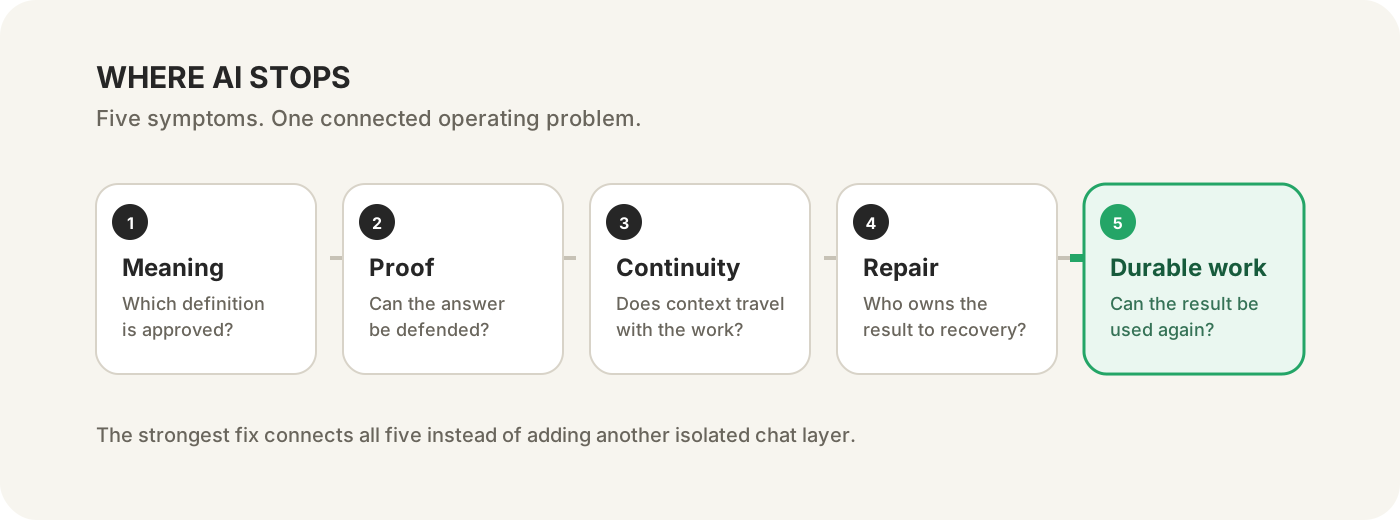
Continue the five-part series
- Part 1: Why AI keeps using the wrong business definition.
- Part 2: How to verify an AI-generated data answer.
- Part 3: Why more MCP servers do not finish the workflow.
- Part 4: Why AI can diagnose a broken dashboard but not repair it.
- Part 5: How to turn AI analysis into a reusable dashboard or workflow.
Or use the five-situation guide to find the stop closest to your team.