Why AI Can Diagnose a Broken Dashboard but Not Repair It
Diagnosis ends with a likely cause. Repair ends only after the permitted change runs and the original business result is useful again.
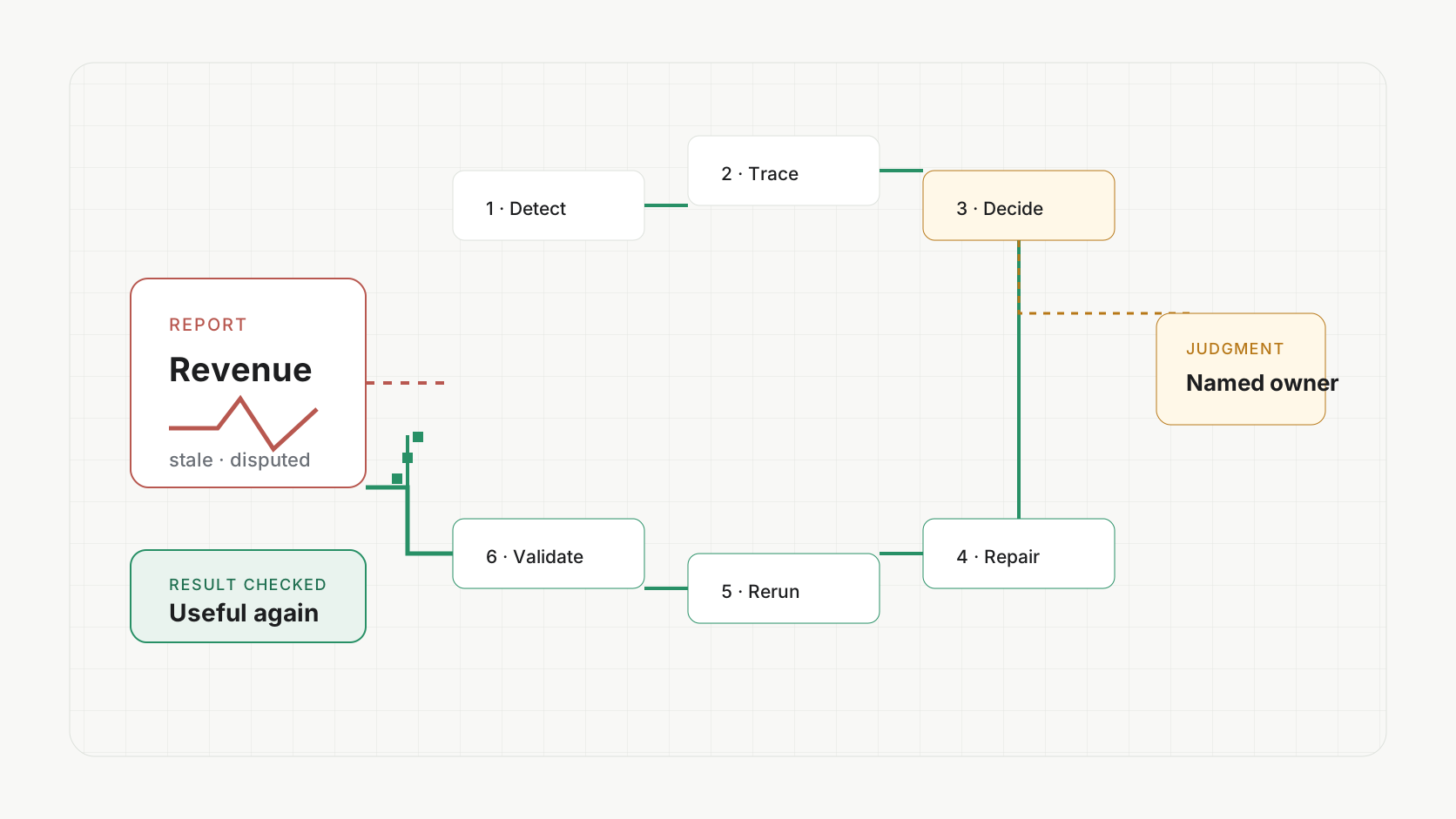
A dashboard looks wrong. You paste the error or SQL into an AI. It finds a likely cause and writes a corrected query. Then the production fix comes back to your team.
This is one of the most expensive misunderstandings in AI for data. We confuse a good diagnosis with a repaired business result.
The query can be correct while the dashboard is still stale. The pipeline can succeed while the CRM field is still empty. The number can look wrong even when nothing technical failed because the approved business definition changed.
The hidden ambiguityThe same wrong number can have five different causes
When a growth leader says Meta-acquired revenue looks too low, the visible symptom does not tell you what broke.
Technical path
Source freshness, integration mapping, transformation logic, processing failure, cache, or destination write.
Business path
A changed definition, a different comparison window, or a new analytical question that should not overwrite the standard.
Suppose the approved definition of a reactivated customer changed from returning within six months to returning within one year. The dashboard may be working exactly as designed. The user may actually want a comparison across three, six, and twelve months.
If the AI assumes the dashboard is broken and “fixes” the Metric back to six months, it can create a production regression while appearing helpful.
Repair begins by distinguishing three things:
- A failed system: the approved result did not process or arrive correctly.
- A changed rule: the current result is correct under a new approved definition.
- A new request: the user needs another view without changing the company standard.
Why a corrected query is not the finish line
A coding assistant is excellent at explaining errors and proposing code changes. That is valuable. The repair loop usually extends beyond the code.
The model may depend on an upstream source that did not finish. The transformation may need to run in the correct environment. The Dataset or materialization may need rebuilding. A Report may cache the old state. A Workflow may still be failing at an external destination. The visible dashboard may use a different Metric than the one the AI changed.
Even when every technical step is correct, someone has to inspect the place where the user experiences the result.
Diagnosis
Likely cause, suggested SQL, a list of checks, or a ticket for someone else.
Repair
Cause established, permitted change made, processing rerun, downstream state checked, original result validated, and owner recorded.
Why alerts and AI patches still leave one person holding the system
Most teams already have pieces of the repair loop. They have freshness alerts, incident tickets, AI-generated patches, orchestration reruns, and BI refresh controls. Each piece is useful. The gap is who understands how the pieces relate and remains responsible across them.
- 01
Alert and ticketDetect and hand off
The issue is visible, but someone still has to reconstruct the affected business path.
- 02
AI-generated patchChange one artifact
The query or model may improve while processing, caches, reports, and workflows remain unchanged.
- 03
Orchestrator rerunRepeat configured work
A rerun can reproduce the same bad definition or send the correct data to the wrong destination.
- 04
Dashboard refreshUpdate the surface
A refresh cannot repair an upstream mapping, broken transformation, or disputed Metric.
- 05
Data personUnderstand the whole path
The analyst or engineer closes the gaps because they know the definitions, systems, history, and people involved.
The real bottleneck is not the absence of an alert or patch. It is that complete system understanding and authority still live with one person.
That person is often the data expert because they can translate between the user's symptom and the warehouse reality. They know that “Meta revenue is low” could mean a delayed source, a changed campaign mapping, a duplicated join, a stale Dataset, a revised revenue definition, or simply a new comparison the dashboard was never designed to show.
The closed loopA complete repair has six stages
The weekly Report shows an unexplained drop.
Check source freshness, campaign mapping, revenue Metric, and Dataset.
Confirm failure, changed rule, or a new comparison request.
Make the controlled mapping, model, or definition change.
Process the affected path from source through Report.
Inspect records, totals, the rendered Report, and downstream uses.
The loop needs an owner from the beginning. Not an owner of the SQL file or the dashboard ticket. An owner of returning the business result to a useful state.
This is where many AI implementations quietly give the work back to the customer. The assistant says what it cannot determine, and the user must find the analyst, engineer, integration owner, or consultant who can continue.
How to build the repair path yourself
A mature internal data team can solve this well. The essential pieces are not mysterious, but they have to operate together.
- Trace from the visible result. Connect the dashboard or destination to its Metric, Dataset, transformations, sources, processing runs, and external writes.
- Preserve definition history. Record when a business rule changed, why, who approved it, and which uses depend on it.
- Control mutations. Use permissions, versioning, review, and rollback appropriate to the consequence.
- Make reruns explicit. Know which upstream and downstream work must execute after the change.
- Validate the consumer surface. Inspect the Report, customer record, exported file, or workflow destination, not only the query result.
- Attach the incident context. Keep the evidence, attempted work, decisions, and remaining ambiguity with the same Task.
- Name the recovery owner. Someone must continue when the AI reaches a business decision or unsupported failure.
If your current monitoring and incident process already closes that loop reliably, keep it. An AI assistant can make the team faster without replacing the operating model.
What Polyform owns differently
Polyform's data foundation is designed around a warehouse-native path with an owner. Within the authorizing user's permissions and available connections, one supervising AI can inspect the connected path from source and transformation through processing, definition, Dataset, Report, and Workflow state. Because the same system can touch those permitted layers, it can complete many repairs that a dashboard assistant or isolated patch generator can only propose.
The important promise is not “AI fixes SQL” or “AI repairs everything alone.” The important promise is that the work can stay attached to the result, the relevant objects, the evidence, the rerun, and the validation path. When the cause is unambiguous, the AI can make and test a controlled change. When the question is really a business decision, the dedicated expert who understands the system owns the continuation instead of sending the customer away with a diagnosis.
The Reports story shows why the original output matters: the number should remain connected to the definition, population, records, and freshness a person needs to understand it.
For the evaluation side of the loop, use the method in How to Measure Whether an AI Agent Completed the Business Job. The agent's “done” message is never the same thing as the inspected resulting state.
Do not buy another diagnosis
When you evaluate an AI repair system, ask one question: who owns the result after the likely cause is found?
If the answer is still your busiest analyst, your clipboard, or another ticket queue, the diagnosis may be useful, but the operating problem remains.
A repair is complete when the original dashboard, Report, Dataset, Workflow, or destination is checked again and someone can say why it is useful now.
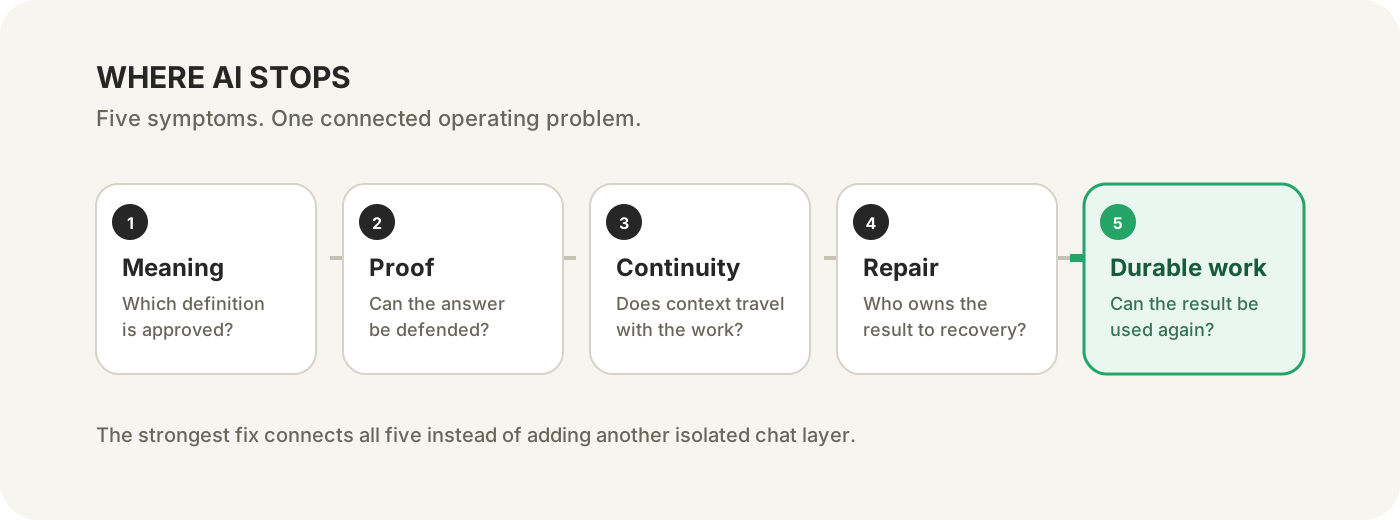
Continue the five-part series
- Part 1: Why AI keeps using the wrong business definition.
- Part 2: How to verify an AI-generated data answer.
- Part 3: Why more MCP servers do not finish the workflow.
- Part 4: Why AI can diagnose a broken dashboard but not repair it.
- Part 5: How to turn AI analysis into a reusable dashboard or workflow.
Or use the five-situation guide to find the stop closest to your team.