I Added Email to My Mac Studio Codex Setup
tmux kept my remote Codex sessions alive. Email gave me a way to leave, get the result on my phone, and reply to the exact session without opening the terminal again.
tmux solved the first half of asynchronous development. It kept the work running when I closed my laptop. It did not stop me from reopening my laptop every few minutes to see whether the work was done.
In Part 1 of my Mac Studio development setup, I explained how I moved the heavy work off my MacBook Air. The Studio sits in a closet on Ethernet. I SSH into it, create Git worktrees, and run a full development container for each branch. That gives Codex the database, backend, frontend, RabbitMQ, tests, and the rest of the product together. Several realistic environments can run at the same time while the laptop in my bag stays light.
tmux is the hinge. A dropped SSH connection does not kill the agent, and I can reattach to the same session later. This is exactly what tmux sessions are designed to make possible.
But I was still supervising the work like a nervous parent outside a bedroom door. Open the terminal. SSH in. Reattach. Check. Detach. Repeat.
tmux kept it alive
The remote Codex process survives a laptop disconnect, but I still have to visit the session to learn what happened and type the next instruction.
Email brings it back
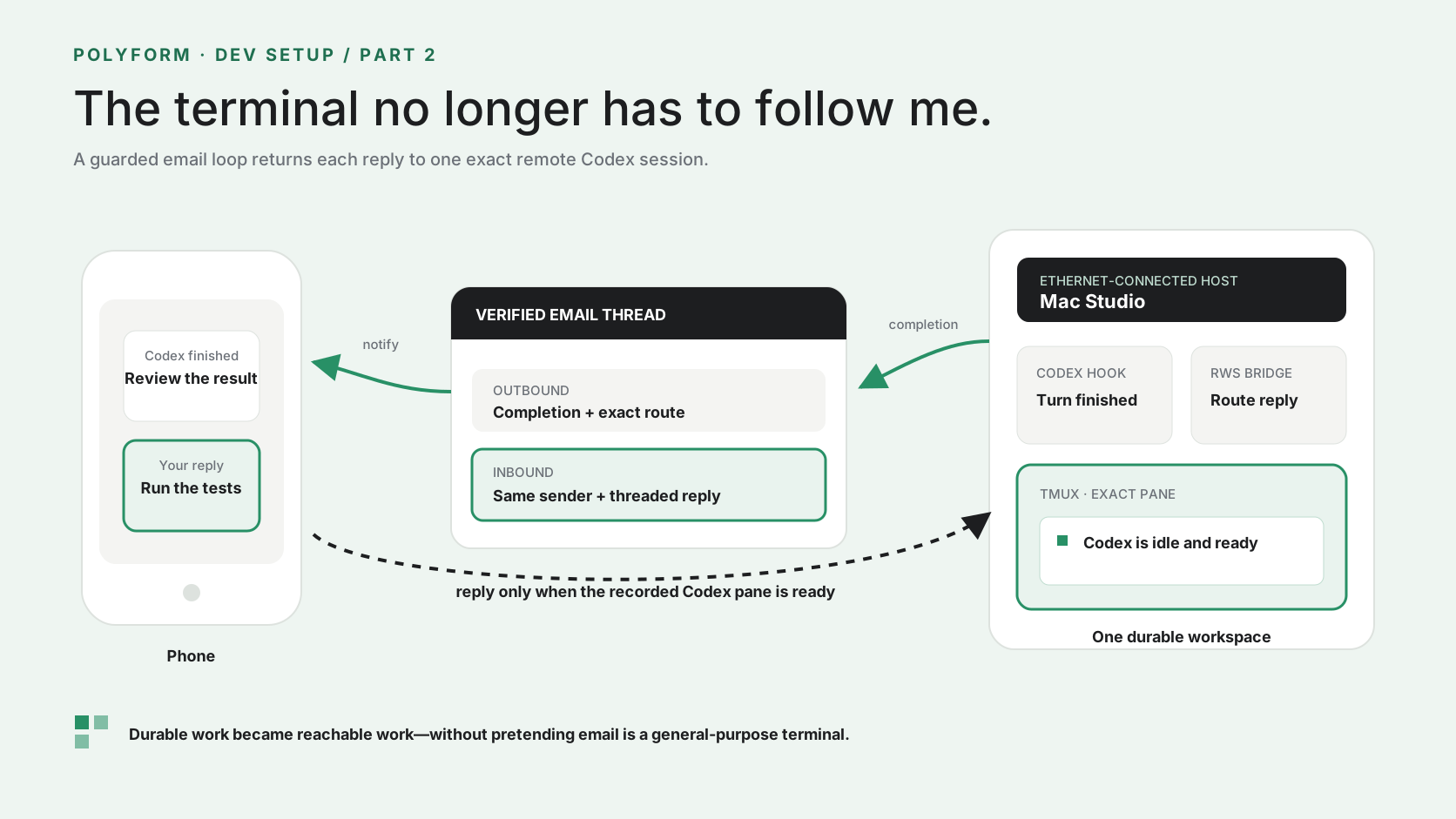
The completed turn reaches me. My reply returns to the same recorded session, workspace, and pane only when Codex is waiting for input.
Now the session emails me when Codex stops
I added one more layer to the setup: a two-way email bridge around the Codex session.
When Codex finishes a turn inside one of my remote development workspaces, a repository hook receives the Stop event. The hook knows which repository, worktree, development slot, tmux session, tmux pane, and Codex session produced the result. It sends the final assistant message to the Polyform backend, which emails it to me as a threaded completion message.
I can read that message on my phone. If the next step is simple—run the focused test, fix the naming, compare the output, continue with the next item—I reply to the email.
An inbound-email handler accepts the reply, verifies that it belongs to the completion thread and comes from the same recipient, then queues it for the signed route attached to that exact session. A small bridge process keeps running on the Mac Studio, polls for replies, and delivers the text to the recorded tmux pane.
The final message and session route are captured.
The completion goes to the authenticated operator.
The next instruction stays in the email thread.
Sender, thread, region, and signed route must agree.
The exact pane must still contain the recorded Codex process.
The reply is pasted and submitted only when the pane is ready.

The important part is not the email
Email is only the interface. The route behind it is what makes the setup useful.
I did not want a general mailbox that could type into whichever terminal happened to be open. Each completion creates or reuses a signed route bound to one operator, repository, workspace, development slot, tmux session, pane, Codex session, and region. A reply for one worktree cannot quietly wander into another.
The bridge is equally conservative. Before it types anything, it checks that the route still matches the state file, the bridge lease is current, the exact tmux pane still exists, the recorded process is still Codex, and the pane is marked ready. If Codex is busy, the pane disappeared, the container stopped, or the process changed, the reply stays queued and the bridge reports why. It does not guess a different destination.
The backend also deduplicates completion messages and inbound replies, limits message size, and acknowledges a reply only after the bridge delivered it. Those are boring details. Boring details are the entire difference between “email as a handy remote control” and “email randomly types into a shell.”
Deliver the reply
The sender and signed route match, the bridge is current, the exact pane exists, the recorded Codex process is alive, and the session is waiting.
Keep it queued
The pane is busy, missing, stopped, changed, or no longer running the recorded Codex process. The system explains the reason instead of improvising.
How I wired this into my remote workspaces
This is an experimental internal extension around my Polyform development setup. It is not a built-in Codex email feature and it is not a public package you can install today. But the pattern is small enough to rebuild around your own email provider and remote host.
- Start with the durable environment. Put each branch in an isolated worktree and development container, then run Codex in a named tmux pane. Part 1 covers that foundation.
- Give the pane an explicit route. My RWS launcher passes the repository, workspace, slot, tmux session, and pane ID into the development shell. No name is inferred later from whatever terminal is active.
- Add repository-local lifecycle hooks. A prompt hook marks the pane busy, a Stop hook sends the completion, and a session-end hook marks the route closed. Codex must be restarted after the trusted hook file changes so it loads the configuration.
- Send completions through an authenticated backend. The service creates the threaded message, signs the route, records deduplication state, and sends only to the current internal operator.
- Accept replies through an inbound webhook. My setup uses Postmark's inbound webhook and its parsed reply fields. The handler verifies the thread and sender before it queues any text.
- Run one detached bridge on the remote host. The bridge polls the backend, validates the recorded Codex process, pastes into the exact tmux pane, submits the reply, and acknowledges delivery.
The repository hook is intentionally thin. In simplified form, the completion side looks like this:
{
  "hooks": {
    "Stop": [{
      "hooks": [{
        "type": "command",
        "command": "python3 .codex/hooks/workspace_email.py notify",
        "async": true,
        "timeout": 60
      }]
    }]
  }
}
The remote bridge is also a small loop. This is the shape, not the production code:
while True:
    for reply in poll_replies(active_routes):
        target = exact_codex_pane(reply.route)
        if target.is_ready():
            target.paste(reply.message)
            target.submit()
            acknowledge(reply.id)
In my environment, once the development pane has the route variables and Codex has loaded the hook, the operator controls are deliberately plain:
rws email-bridge
rws email-bridge status
rws email-bridge stop
The first command installs and starts the detached bridge on the Studio. Closing my local terminal or laptop does not stop it. The last command turns off both completion emails and reply delivery.
What I still will not do from email
This does not turn my inbox into a replacement for the development environment. I still open the terminal for anything that needs careful context, long output, an interactive command, or a decision with real consequences. I still open the browser to inspect the product. I still review diffs, test database changes, and check the actual resulting state.
I also do not email secrets, credentials, customer data, destructive commands, or vague instructions such as “ship whatever is there.” Email is a convenient place for the next bounded instruction, not a reason to lower the bar for review.
The useful version of this workflow is surprisingly modest. The Mac Studio gives the agent a complete environment and enough memory to keep several worktrees running. tmux preserves the session. The email bridge tells me when my attention is useful and gives me a narrow way to respond.
That combination is the part I love. I can start several pieces of work from my terminal, put the laptop away, and let the Studio keep doing its job. When Codex needs me, the result appears on my phone. If the next move is obvious, I reply. If it is not, I go back to the real environment and look.
Asynchronous AI work should not mean giving an agent infinite autonomy. It should mean the work can continue without demanding that I stare at it—and that it knows exactly how to bring me back when the next decision belongs to me.
That is also the principle behind Polyform's approach to durable AI work: give the agent a complete place to work, preserve the state, make the return path explicit, and keep important judgment with a person.